Monday, March 28, 2016

Java Logging Examples : How To Compare Log Level Severity

Intro


This examples will demonstrates how to compare log level severity for each log level. The java.util.logging.Level class has an intValue() method that return the integer value of Level‘s severity.

Examples


package com.freesamplecode.java.logging;

import java.util.logging.Level;

public class CompareLogLevelSeverityDemo {
 public static void main(String[] args){
  Level info = Level.INFO;
        Level warning = Level.WARNING;
        Level config = Level.CONFIG;
        Level finest = Level.FINEST;
        
        if (info.intValue() < warning.intValue()) {
            System.out.println(info + "(" + info.intValue() + ") is less severe than " +
                    warning + "(" + warning.intValue() + ")");
        }

        if (finest.intValue() < info.intValue()) {
            System.out.println(finest + "(" + finest.intValue() + ") is less severe than " +
                    info + "(" + info.intValue()+ ")");
        }
        
        if (config.intValue() < warning.intValue()) {
            System.out.println(config + "(" + config.intValue() + ") is less severe than " +
                    warning + "(" + warning.intValue()+ ")");
        }
 }
}

Output


INFO(800) is less severe than WARNING(900)
FINEST(300) is less severe than INFO(800)
CONFIG(700) is less severe than WARNING(900)

Screenshot


How To Compare Log Level Severity In Java


Java Logging Examples : How To Limit The Size Of Log File

Intro

This examples will demonstrates how to limit size of log file just one file.

Examples


package com.freesamplecode.java.logging;

import java.io.IOException;
import java.util.logging.FileHandler;
import java.util.logging.Logger;

public class LimitLogFileDemo {
 
 //set maximal log file in 1 KB
 public static final int FILE_SIZE = 1 * 1024;
 
 public static void main(String[] args){
  Logger logger = Logger.getLogger(LimitLogFileDemo.class.getName());
  
  
  try {
   //create an object handler
   FileHandler handler = new FileHandler("limitlog.log", FILE_SIZE, 1, true);
   
   logger.addHandler(handler);
  } catch (SecurityException | IOException e) {
   e.printStackTrace();
  }
  
  logger.info("Test info");
        logger.warning("Test warning");
        logger.severe("Test severe");
   
 }
}

Output


Mar 29, 2016 5:23:38 AM com.freesamplecode.java.logging.LimitLogFileDemo main
INFO: Test info
Mar 29, 2016 5:23:38 AM com.freesamplecode.java.logging.LimitLogFileDemo main
WARNING: Test warning
Mar 29, 2016 5:23:38 AM com.freesamplecode.java.logging.LimitLogFileDemo main
SEVERE: Test severe

Screenshoot


How To Limit The Size Of Log File In Java

Friday, March 11, 2016

Java Logging Example : How To Use Log Formatter

Intro

This articles, will demonstrates how to use simple log formatter using Java program.

Example


package com.freesamplecode.java.logging;

import java.util.logging.ConsoleHandler;
import java.util.logging.Handler;
import java.util.logging.Level;
import java.util.logging.LogRecord;
import java.util.logging.Logger;
import java.util.logging.SimpleFormatter;

public class SimpleLogFormatterDemo {
 public static void main(String[] args){
  
  Logger logger = Logger.getLogger(SimpleLogFormatterDemo.class.getName());
  logger.setUseParentHandlers(false);
  
  Handler handler = new ConsoleHandler();
  handler.setFormatter(new SimpleFormatter(){
   public String format(LogRecord logRecord){
    return new java.util.Date(logRecord.getMillis()) + " "
              +logRecord.getLevel() + " "
        +logRecord.getSourceClassName() + "."
        +logRecord.getSourceMethodName()+ " : "
        +logRecord.getMessage()
        +"\n";
   }
  });
  
  logger.addHandler(handler);
  
  
  logger.log(Level.INFO, "This is INFO message level");
  logger.log(Level.WARNING, "This is WARNING message level");
  logger.log(Level.CONFIG, "This is CONFIG message level");
 }
}


Output


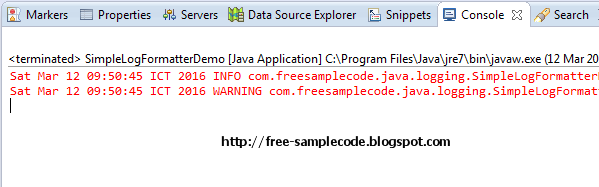
Sat Mar 12 09:50:45 ICT 2016 INFO com.freesamplecode.java.logging.SimpleLogFormatterDemo.main : This is INFO message level
Sat Mar 12 09:50:45 ICT 2016 WARNING com.freesamplecode.java.logging.SimpleLogFormatterDemo.main : This is WARNING message level


Screenshot

How To Use Log Formatter In Java

Java Logging Example : How To Create Simple Logging

Intro


This example will demonstrates the basic usage simple logging in the Java program.

Example


package com.freesamplecode.java.logging;

import java.util.logging.Level;
import java.util.logging.Logger;

public class CreateSimpleLoggingDemo {
 public static void main(String[] args){
  Logger logger = Logger.getLogger(CreateSimpleLoggingDemo.class.getName());
  
  logger.log(Level.INFO, "This is INFO level message");
  logger.log(Level.SEVERE, "This is SEVERE level message");
  logger.log(Level.WARNING, "This is WARNING level message");
  logger.log(Level.FINE, "This is FINE level message");
 }
}


Output


Mar 12, 2016 6:46:04 AM com.freesamplecode.java.logging.CreateSimpleLoggingDemo main
INFO: This is INFO level message
Mar 12, 2016 6:46:07 AM com.freesamplecode.java.logging.CreateSimpleLoggingDemo main
SEVERE: This is SEVERE level message
Mar 12, 2016 6:46:07 AM com.freesamplecode.java.logging.CreateSimpleLoggingDemo main
WARNING: This is WARNING level message

Screenshoot


How To Create Simple Logging

Monday, March 7, 2016

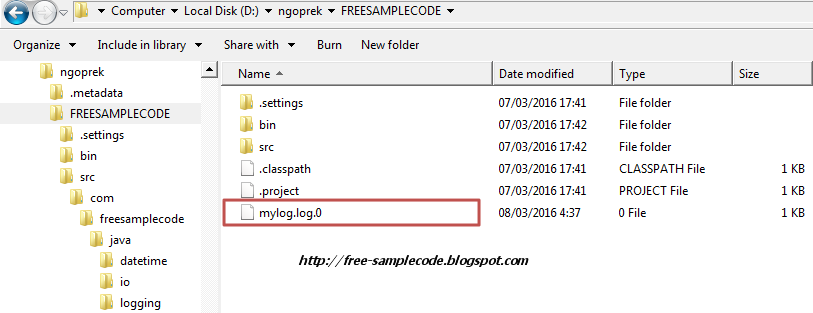
Java Logging Example : How To Create A Rolling Log Files

Example


package com.freesamplecode.java.logging;

import java.io.IOException;
import java.util.logging.FileHandler;
import java.util.logging.Logger;
import java.util.logging.SimpleFormatter;

public class CreateRollingLogFileDemo {
 public static final int FILE_SIZE = 1024;

 public static void main(String[] args) {
  Logger logger = Logger.getLogger(CreateRollingLogFileDemo.class.getName());
  
  try {
   
   // create log file with 10 sequence
   
   FileHandler fileHandler = new FileHandler("mylog.log", FILE_SIZE, 10, true);
   fileHandler.setFormatter(new SimpleFormatter());
   
   logger.addHandler(fileHandler);
   logger.setUseParentHandlers(false);
   
  } catch (SecurityException | IOException e) {
   logger.warning("Failed to initialize logger handler.");
  }
  
  logger.info("Logging information message.");
        logger.warning("Logging warning message.");
 }
}

Output


mylog.log.0

Mar 08, 2016 4:35:59 AM com.freesamplecode.java.logging.CreateRollingLogFileDemo main
INFO: Logging information message.
Mar 08, 2016 4:35:59 AM com.freesamplecode.java.logging.CreateRollingLogFileDemo main
WARNING: Logging warning message.
Mar 08, 2016 4:37:25 AM com.freesamplecode.java.logging.CreateRollingLogFileDemo main
INFO: Logging information message.
Mar 08, 2016 4:37:25 AM com.freesamplecode.java.logging.CreateRollingLogFileDemo main
WARNING: Logging warning message.
Mar 08, 2016 4:37:34 AM com.freesamplecode.java.logging.CreateRollingLogFileDemo main
INFO: Logging information message.
Mar 08, 2016 4:37:34 AM com.freesamplecode.java.logging.CreateRollingLogFileDemo main
WARNING: Logging warning message.
Mar 08, 2016 4:37:53 AM com.freesamplecode.java.logging.CreateRollingLogFileDemo main
INFO: Logging information message.
Mar 08, 2016 4:37:53 AM com.freesamplecode.java.logging.CreateRollingLogFileDemo main
WARNING: Logging warning message.