Friday, April 1, 2016

Java I/O Examples : How To Delete Temporary File

Intro


This examples will demonstrates how to delete a temporary file using Java program. To delete it, you can use one of the following method:
  • deleteOnExit(), delete temporary file when program is terminated or exited.
  • delete(), delete temporary file imediately,

Examples


package com.freesamplecode.java.io;

import java.io.File;
import java.io.IOException;

public class DeleteTemporaryFileDemo {
	public static void main(String[] args){
		
		try {
			
			// create temporary file "test.tmp"
			
			File tempFile = File.createTempFile("test", ".tmp");
			
			
			// delete temporary file when the program is terminated or existed
			
			tempFile.deleteOnExit();
			
			//delete temporary file immediately
			
            //tempFile.delete();
			
			System.out.println("Temporary file "+tempFile.getName() + " is successfully deleted");
		} catch (IOException e) {
			// TODO Auto-generated catch block
			e.printStackTrace();
		}
	}
}


Output


Temporary file test1195400416650249998.tmp is successfully deleted

How To Delete Temporary File In Java

Java I/O Examples : How To Generate A File Checksum Value With MD5 Algorithm

Intro


This examples will demonstrates how to generate a file checksum with MD5 algorithm. To generate it, you should use MessageDigest class. This output is in the hexadecimal format.

Examples


package com.freesamplecode.java.io;

import java.io.FileInputStream;
import java.io.FileNotFoundException;
import java.io.IOException;
import java.security.MessageDigest;
import java.security.NoSuchAlgorithmException;

public class FileChecksumDemo {
	public static void main(String[] args){
		
		//Step 1 : prepare file name
		String fileName = "D:/temp/test/file_test.txt";
		
		try {
			
			//Step 2 : create MD5 MessageDigest object
			MessageDigest messageDigest = MessageDigest.getInstance("MD5");
			
			// Step 3 : read data
			FileInputStream fis = new FileInputStream(fileName);
			
			byte[] bytedata = new byte[1024];
			
			int read = 0;
			
			while((read = fis.read(bytedata)) != -1){
				messageDigest.update(bytedata, 0, read);
			}
			
			//Step 4: calculate digest bytedata 
			byte[] bytemd = messageDigest.digest();
			
			//Step 5 : convert into hex format
			
			StringBuffer sb = new StringBuffer("");
			
			for(int i = 0; i < bytemd.length; i++){
				sb.append(Integer.toString((bytemd[i] & 0xff) + 0x100, 16).substring(1));
			}
			
			//Step 6 : Display to console
			System.out.println("Result.....");
			System.out.println(fileName+" : " + sb.toString());
			
		} catch (NoSuchAlgorithmException e) {
			e.printStackTrace();
		} catch (FileNotFoundException e) {
			e.printStackTrace();
		} catch (IOException e) {
			e.printStackTrace();
		}
		
	}
}

Output


Result.....
D:/temp/test/file_test.txt : c16665a5040f355d62eea6d2d5274c83

Screenshot

How To Generate A File Checksum Value With MD5 Algorithm In Java


Wednesday, March 30, 2016

Java I/O Examples : How To Move A File To Another Directory

Intro


This examples will demonstrates how to move a file from one directory to another directory. It's very tricky, we will use File.renameTo() method to move it.

Examples


package com.freesamplecode.java.io;

import java.io.File;

public class MoveFileDemo {
 public static void main(String[] args){
  
  String fileName = "test.txt";
  
  //source directory
  File sourceDir = new File("D:/temp/sourcedir/"+fileName);
  
  //destination directory
  File destDir = new File("D:/temp/destdir/"+fileName);
  
  if(sourceDir.renameTo(destDir)){
   System.out.println("Move File operation is successfully...");
  }else{
   System.out.println("Failed to execute move file operation, please try again...");
  }
 }
}


Output


Move File operation is successfully...

Screenshot


before move file

How To Move A File To Another Directory In Java

after move file

How To Move A File To Another Directory In Java

Tuesday, March 29, 2016

Java I/O Examples : How To Write An Object To File

Intro


This examples will demonstrates how to write a Java object into file using serialization method. To use serialization method, your Java class have to implement the Serializable interface.

Examples


Employee.java

public class Employee implements Serializable{
 /**
  * 
  */
 private static final long serialVersionUID = 8836890329708390627L;
 
 private long id;
 private String name;
 private String sex;
 private String placeOfBirth;
 private Date dateOfBirth;
 
 public long getId() {
  return id;
 }
 
 public void setId(long id) {
  this.id = id;
 }
 
 public String getName() {
  return name;
 }
 
 public void setName(String name) {
  this.name = name;
 }
 
 public String getSex() {
  return sex;
 }
 
 public void setSex(String sex) {
  this.sex = sex;
 }
 
 public String getPlaceOfBirth() {
  return placeOfBirth;
 }
 
 public void setPlaceOfBirth(String placeOfBirth) {
  this.placeOfBirth = placeOfBirth;
 }
 
 public Date getDateOfBirth() {
  return dateOfBirth;
 }
 
 public void setDateOfBirth(Date dateOfBirth) {
  this.dateOfBirth = dateOfBirth;
 }
 
}

WriteObjectToFileDemo.java

public class WriteObjectToFileDemo {
 public static void main(String[] args){
  //create an Employee object
  Employee employee = new Employee();
  employee.setId(879829);
  employee.setName("Nursalim");
  employee.setPlaceOfBirth("Brebes");
  employee.setDateOfBirth(new Date());
  employee.setSex("M");
  
  try {
   FileOutputStream fos = new FileOutputStream("c:/TEMP/employee.ser");
   
   ObjectOutputStream oos = new ObjectOutputStream(fos);
   oos.writeObject(employee);
   oos.close();
   
   System.out.println("Done!, Successfully write object to file...");
  } catch (FileNotFoundException e) {
   System.err.println("File not found");
   e.printStackTrace();
  } catch (IOException e) {
   System.err.println("Error encountered...");
   e.printStackTrace();
  }
  
 }
}

Output


Done!, Successfully write object to file...

Screenshot


How To Write An Object To File In Java

Java I/O Examples : How To Read An Object From File

Intro


This examples will demonstrates how to read a Java object from file which means deserialization.

Examples


Employee.java

package com.freesamplecode.java.io;

import java.io.Serializable;
import java.util.Date;

public class Employee implements Serializable{
 /**
  * 
  */
 private static final long serialVersionUID = 8836890329708390627L;
 
 private long id;
 private String name;
 private String sex;
 private String placeOfBirth;
 private Date dateOfBirth;
 
 public long getId() {
  return id;
 }
 
 public void setId(long id) {
  this.id = id;
 }
 
 public String getName() {
  return name;
 }
 
 public void setName(String name) {
  this.name = name;
 }
 
 public String getSex() {
  return sex;
 }
 
 public void setSex(String sex) {
  this.sex = sex;
 }
 
 public String getPlaceOfBirth() {
  return placeOfBirth;
 }
 
 public void setPlaceOfBirth(String placeOfBirth) {
  this.placeOfBirth = placeOfBirth;
 }
 
 public Date getDateOfBirth() {
  return dateOfBirth;
 }
 
 public void setDateOfBirth(Date dateOfBirth) {
  this.dateOfBirth = dateOfBirth;
 }
 
}

ReadObjectFromFileDemo.java

public class ReadObjectFromFileDemo {
 public static void main(String[] args){
  try {
   FileInputStream fis = new FileInputStream("c:/TEMP/employee.ser");
   ObjectInputStream ois = new ObjectInputStream(fis);
   Employee employee = (Employee) ois.readObject();
   
   System.out.println("Read Employee data...");
   System.out.println("ID : " +employee.getId());
   System.out.println("Name : " +employee.getName());
   System.out.println("Place of Birth : " +employee.getPlaceOfBirth());
   System.out.println("Date of Birth : " +employee.getDateOfBirth());
   System.out.println("Gender : " +employee.getSex());
   
   ois.close();
  } catch (FileNotFoundException e) {
   System.err.println("File not found");
   e.printStackTrace();
  } catch (IOException e) {
   System.err.println("Error when accessing file");
   e.printStackTrace();
  } catch (ClassNotFoundException e) {
   e.printStackTrace();
  }
 }
}

Output


Read Employee data...
ID : 879829
Name : Nursalim
Place of Birth : Brebes
Date of Birth : Tue Mar 29 15:32:25 ICT 2016
Gender : M

Screenshot

How To Read An Object From File In Java


Java I/O Examples : How To Get Temporary File Path

Intro


This examples will demonstrates how to get or display temporary file path in your operating system (os).

Examples


package com.freesamplecode.java.io;

import java.io.File;
import java.io.IOException;

public class GetTemporaryFilePathDemo {
 public static void main(String[] args){
  try {
   
   //step 1. create a temporary file
   File file = File.createTempFile("tempfile", ".tmp");
   
   //step 2. get absolute path
   String absolutePath = file.getAbsolutePath();
   
   //step 3. get temporary file path
   String temporaryFilePath = absolutePath.substring(0, absolutePath.lastIndexOf(File.separator));
   
   //step 4. print to console
   System.out.println("Absolute path : "+absolutePath);
   System.out.println("Temporary File path : "+temporaryFilePath);
   
  } catch (IOException e) {
   System.err.println("Error when creating a file..");
   e.printStackTrace();
  }
  
 }
}

Output


Absolute path : C:\Users\Dev\AppData\Local\Temp\tempfile3944253553416804097.tmp
Temporary File path : C:\Users\Dev\AppData\Local\Temp

Screenshot

How To Get Temporary File Path In Java

Java I/O Examples : How To Read A Text File Line By Line

Intro


This examples will demonstrates how to read a text file line by line. To get this, you can use readLine() method in the BufferedReader class.

Examples


package com.freesamplecode.java.io;

import java.io.BufferedReader;
import java.io.FileNotFoundException;
import java.io.FileReader;
import java.io.IOException;

public class ReadFileByLineDemo {
 public static void main(String[] args){
  
  String strLine = "";
  String fileName = "D:/temp/test/file_test.txt";
  try {
   
   BufferedReader br = new BufferedReader(new FileReader(fileName));
   while((strLine = br.readLine()) != null){
    System.out.println(strLine);
   }
  } catch (FileNotFoundException e) {
   System.err.print("Unable to find file :"+fileName);
   e.printStackTrace();
  } catch (IOException e) {
   System.err.print("Error encountered when accessing file "+fileName);
   e.printStackTrace();
  }
  
 }
}

Output


Hello,
Welcome to http://free-samplecode.blogspot.com
May this website useful for you.

Thanks,

Admin

Screenshoot


How To Read A Text File Line By Line In Java

Sunday, March 27, 2016

Java I/O Examples : How To Set File Permissions

Intro


This examples will demonstrates how to set file permissions using Java program. To set file permissions, you can use the following methods, are File.setExecutable(), File.setReadable(), and File.setWritable() methods.

Examples


package com.freesamplecode.java.io;

import java.io.File;

public class SetFilePermissionDemo {
 public static void main(String[] args){
  File file = new File("D:/temp/test.sh");
  System.out.println("Before set permission...");
  System.out.println("Can execute? : "+file.canExecute());
  System.out.println("Can Write? : "+file.canWrite());
  System.out.println("Can Read? : "+file.canRead());
  
  file.setExecutable(true);
  file.setWritable(false);
  file.setReadable(true);
  
  System.out.println("\n After set permission....");
  System.out.println("Can execute? : "+file.canExecute());
  System.out.println("Can Write? : "+file.canWrite());
  System.out.println("Can Read? : "+file.canRead());
 }
}


Output


Before set permission...
Can execute? : true
Can Write? : false
Can Read? : true

After set permission....
Can execute? : true
Can Write? : false
Can Read? : true

Screenshot

How To Set File Permissions In Java

Java IO Examples : How To Determine File Or Directory In Java

Intro

This examples will demonstrates how to determine file or directory using Java program. To determine object of File is directory or not, you can use File.isFile() method. This method will return a boolean value. Return true if object is a file, otherwise object is a directory.

Examples


package com.freesamplecode.java.io;

import java.io.File;

public class DetermineFileOrDirectoryDemo {
 public static void main(String[] args){
  File file = new File("D:/temp");
  if(file.isFile()){
   System.out.println(file.getAbsolutePath() + " is a file");
  }else{
   System.out.println(file.getAbsolutePath() + " is a directory");
  }
 }
}


Output


D:\temp is a directory

Screenshot


How To Determine File Or Directory In Java

Wednesday, March 16, 2016

Java Date And Time Examples : How To Display Month Of The Year Using Calendar Class

Intro


This examples, will demonstrates how to display month of the year using java Calendar class.

Examples


package com.freesamplecode.java.datetime;

import java.util.Calendar;

public class GetMonthOfYearDemo {
 public static void main(String[] args){
  Calendar cal = Calendar.getInstance();
  
  System.out.println("Current Date (mm-dd-yyy) is : "+(cal.get(Calendar.MONTH)+1)
    +"-"+cal.get(Calendar.DATE)
    +"-"+cal.get(Calendar.YEAR));
  
  String[] monthOfYear = new String[]{"January", "February", "March", "April"
    , "May","June","July","August","September","October","November","December"};
  
  System.out.println("Current Month is : "+monthOfYear[cal.get(Calendar.MONTH)]);
 }
}


Output


Current Date (mm-dd-yyy) is : 3-17-2016
Current Month is : March


Screenshot


How To Display Month Of The Year Using Calendar Class

Java I/O Examples : How To Display Directory Contents

Intro


This examples, will demonstrates how to display directory contents using Java program.

Examples


package com.freesamplecode.java.io;

import java.io.File;
import java.io.IOException;

public class DisplayDirectoryContentsDemo {
 public static void main(String[] args) {

  try {
   File dir = new File("D:/temp");

   File[] listOfFile = dir.listFiles();

   for (File file : listOfFile) {
    if (file.isDirectory()) {
     System.out.print("Directory ==> ");
    } else {
     System.out.print("File ==> ");
    }

    System.out.println(file.getCanonicalPath());

   }

  } catch (IOException e) {
   e.printStackTrace();
  }

 }
}


Output


File ==> D:\temp\All.log
File ==> D:\temp\Angger Tulus Abdillah.zip
File ==> D:\temp\BrpUpdateHosts.bat
File ==> D:\temp\buat patria.zip
File ==> D:\temp\cap-server.jar
File ==> D:\temp\console_log.html
File ==> D:\temp\console_log.html.bak
File ==> D:\temp\contoh_heading.html
File ==> D:\temp\contoh_heading.html.bak
File ==> D:\temp\core-engine.jar
File ==> D:\temp\corp.war
File ==> D:\temp\create_table.sql
Directory ==> D:\temp\Curanmor
Directory ==> D:\temp\data
File ==> D:\temp\data.sql
File ==> D:\temp\data.zip
File ==> D:\temp\debugApplet.txt
File ==> D:\temp\document_write.html
File ==> D:\temp\Draft BRP Production Deployment Procedure.doc
File ==> D:\temp\error_log_cif.txt
File ==> D:\temp\file-writer.txt
Directory ==> D:\temp\hazelcast-all
File ==> D:\temp\hazelcast-all.jar
File ==> D:\temp\inner_html.html
Directory ==> D:\temp\IT Article
Directory ==> D:\temp\kaskus
File ==> D:\temp\log4j.properties
File ==> D:\temp\logging.jar
File ==> D:\temp\loggingviewer-server.jar
File ==> D:\temp\logo_BII_2.bmp
File ==> D:\temp\Menu Mobile Token.docx
File ==> D:\temp\PrimeCashApp01.out
File ==> D:\temp\PrismaGatewayUI.jar
File ==> D:\temp\Production Deployment Checklist.docx
File ==> D:\temp\REC NOT FND IMTBL .txt
File ==> D:\temp\SchedulerServlet.class
File ==> D:\temp\slf4j-log4j12-1.5.10.jar
File ==> D:\temp\testfile.txt
File ==> D:\temp\testing_user_id.csv
File ==> D:\temp\unnamed.jpg
File ==> D:\temp\wllog4j.jar


Screenshot

How To Display Directory Contents In Java

Java I/O Examples : How To Get All Directories In File System

Intro


This examples, will demonstrates how to display all directories in operating file system.

Examples


package com.freesamplecode.java.io;

import java.io.File;

public class GetAllDirectoriesDemo {
 public static void main(String[] args){
  File[] directoryList = File.listRoots();
  
  System.out.println("Available directories in file system are : ");
  
  for(File directory : directoryList){
   System.out.println(directory);
  }
 }
}

Output


Available directories in file system are : 
C:\
D:\
E:\

Screenshot

How To Get All Directories In File System In Java

Java I/O Examples : How To Rename A File or Directory

Intro


This example will demonstrates how to rename a file or directory. To rename a file, you can use File.renameTo() method. This method will return a boolean value. Return true if file is success renamed, and return false if failed to rename.

Examples


package com.freesamplecode.java.io;

import java.io.File;

public class RenameFileDemo {
 public static void main(String[] args){
  
  //create old file object
  File oldFile = new File("D:/test/oldfile.txt");
  
  //create new file object
  File newFile = new File("D:/test/newfile.txt");
  
  //rename old file to new file
  boolean isSuccessfullyRenamed = oldFile.renameTo(newFile);
  
  if(isSuccessfullyRenamed){
   System.out.println("File has been successfully renamed");
  }else{
   System.out.println("Failed to renaming file");
  }
 }
}


Output


File has been successfully renamed

Screenshot

Before rename

How To Rename A File or Directory In Java


After rename

How To Rename A File or Directory In Java

Monday, March 14, 2016

Java I/O Examples : How To Get Absolute Path Of The File

Intro


This examples, will demonstrates how to get absolute path of the file. To get an absolute path of the file, you can use File.getAbsolutePath() method.

Examples


package com.freesamplecode.java.io;

import java.io.File;

public class GetAbsolutePathDemo {
 public static void main(String[] args){
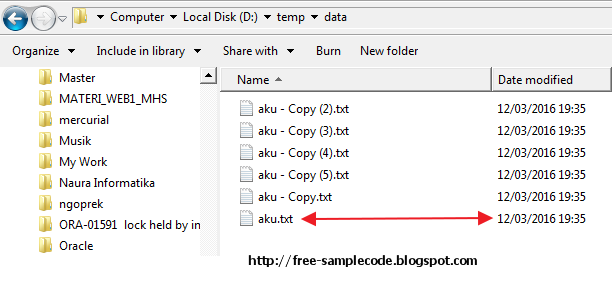
  File file = new File("D:/temp/data/aku.txt");
  
  if(file.exists()){
   System.out.println("Absolute Path : "+file.getAbsolutePath());
   System.out.println("Path : "+file.getPath());
  }
 }
}


Screenshot

How To Get Absolute Path Of The File


Sunday, March 13, 2016

Java I/O Examples : How To Get A File Last Modified

Intro


This examples, we will show how to get a file last modified using Java I/O. To get last modified of the file, you can use lastModified() method of the java.io.File class.


Examples


package com.freesamplecode.java.io;

import java.io.File;
import java.sql.Date;

public class GetLastModifiedFileDemo {
 public static void main(String[] args){
  File file = new File("D:/temp/data/aku.txt");
  
  if(file.exists()){
   long lastModified = file.lastModified();
   System.out.println("Last modified : "+new Date(lastModified));
  }
  
 }
}


Output


Last modified : 2016-03-12

Screenshot

How To Get A File Last Modified In Java

Saturday, March 12, 2016

Java I/O Examples : How To Get Size Of The File

Intro.

To get a size of the file, you can use the length() method in the java.io.File class. This method will return a long value.

Examples


package com.freesamplecode.java.io;

import java.io.File;

public class GetFileSizeDemo {
 public static void main(String[] args){
  File file = new File("D:/temp/testfile.txt");
  
  long fileSize = file.length();
  
  System.out.println("File size in bytes : "+fileSize);
  System.out.println("File size in KB : "+(double)fileSize/1024);
  System.out.println("File size in MB : "+(double)fileSize/(1024*1024));
 }
}


Output


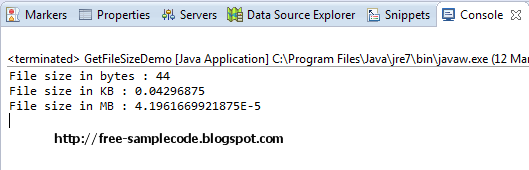
File size in bytes : 44
File size in KB : 0.04296875
File size in MB : 4.1961669921875E-5

Screenshot

How To Get Size Of The File

Java I/O Examples : How To Write String Content Into The File

Intro


This examples, will demonstrates how to write a simple file using String contents. To write this file, you can use FileWriter class.

Examples


package com.freesamplecode.java.io;

import java.io.File;
import java.io.FileWriter;
import java.io.IOException;

public class WriteFileDemo {
 public static void main(String[] args) {
  String contents = "This is a content will be append in the file";

  File file = new File("D:/temp/testfile.txt");
  
  FileWriter fw = null;
  try {
   if (!file.exists()) {
    file.createNewFile();
   }
   
   fw = new FileWriter(file);
   fw.write(contents);
   
   fw.close();
   
   System.out.println("File "+file.getAbsolutePath() + " has been successfully created");
  } catch (IOException e) {
   // TODO Auto-generated catch block
   e.printStackTrace();
  } finally{
   if(fw != null){
    try {
     fw.close();
    } catch (IOException e) {
     e.printStackTrace();
    }
   }
  }
 }
}


Output


File D:\temp\testfile.txt has been successfully created

Screenshot


How To Write String Content Into The File Using Java Program

Wednesday, March 9, 2016

Java I/O Examples : How To Execute DOS Command In Java

Example


package com.freesamplecode.java.io;

import java.io.BufferedReader;
import java.io.IOException;
import java.io.InputStreamReader;

public class ExecuteDOSCommandDemo {
 public static void main(String[] args){
  try{
   Process process = Runtime.getRuntime().exec("cmd /c dir");
   process.waitFor();
   
   BufferedReader br = new BufferedReader(new InputStreamReader(process.getInputStream()));
   
   String line = br.readLine();
   
   while(line != null){
    System.out.println(line);
    line = br.readLine();
   }
   
   System.out.println("done!!");
   
  }catch(IOException ex){
   ex.printStackTrace();
  }catch(InterruptedException ex){
   ex.printStackTrace();
  }
 }
}


Ouput


 Volume in drive D has no label.
 Volume Serial Number is F864-472E

 Directory of D:\ngoprek\FREESAMPLECODE

09/03/2016  07:47              .
09/03/2016  07:47              ..
09/03/2016  20:03               441 .classpath
07/03/2016  17:41               390 .project
07/03/2016  17:41              .settings
09/03/2016  20:03              bin
08/03/2016  04:37               980 mylog.log.0
09/03/2016  07:47                 0 newfile.txt
07/03/2016  17:42              src
               4 File(s)          1.811 bytes
               5 Dir(s)  34.930.794.496 bytes free
done!!


Screenshot

How To Execute DOS Command In Java


Java IO Examples : How To Delete A File In Java

Intro


To delete a file in Java, you can use the delete() method in the java.io.File class. This method returns a boolean value. Return true if the file is successfully deleted, and return false if delete file process is failed or file does not exists.

Examples


package com.freesamplecode.java.io;

import java.io.File;

public class DeleteFileDemo {
 public static void main(String[] args){
  File file = new File("C:\\temp\temp.log");
  
  if(file.delete()){
   System.out.println("File is successfully deleted");
  }else{
   System.out.println("Failed to delete a file or file does not exists");
  }
 }
}

Output


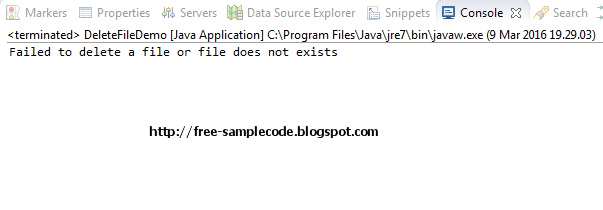
Failed to delete a file or file does not exists

Screenshot


Tuesday, March 8, 2016

Java I/O Examples : How To Create A Temporary File

Java I/O Examples : How To Create A Temporary File

Intro


To create a temporary file in Java, you can use createTempFile() method in the java.io.File class.

Example


package com.freesamplecode.java.io;

import java.io.File;
import java.io.IOException;

public class CreateTemporaryFileDemo {
 public static void main(String[] args){
  File tempFile = null;
  try {
    tempFile = File.createTempFile("tempfile", "tmp");
    
    System.out.println("Successfully created temp file in "+tempFile.getAbsolutePath());
  } catch (IOException e) {
   // TODO Auto-generated catch block
   e.printStackTrace();
  }
 }
}

Output


Successfully created temp file in C:\Users\Dev\AppData\Local\Temp\tempfile5993040830414702074tmp